PII redaction for calls and transcripts: what gets hidden, and when
PII redaction hides or removes PII, the personally identifiable information in your data: a caller's name, email, address or date of birth. In TrackDrive it works in three places.
It controls who can see a caller's phone number. It clears personal data from old records. And it strips sensitive data from call transcripts before they're stored.
Why PII redaction exists
Every call and lead you track carries personal data. Callers give a name, an email and an address. Transcripts hold what they said out loud.
Once the call is over, that data stays in your account, in your grids and in your exports. PII redaction lets you keep the reporting and drop the personal details.
The three controls in TrackDrive
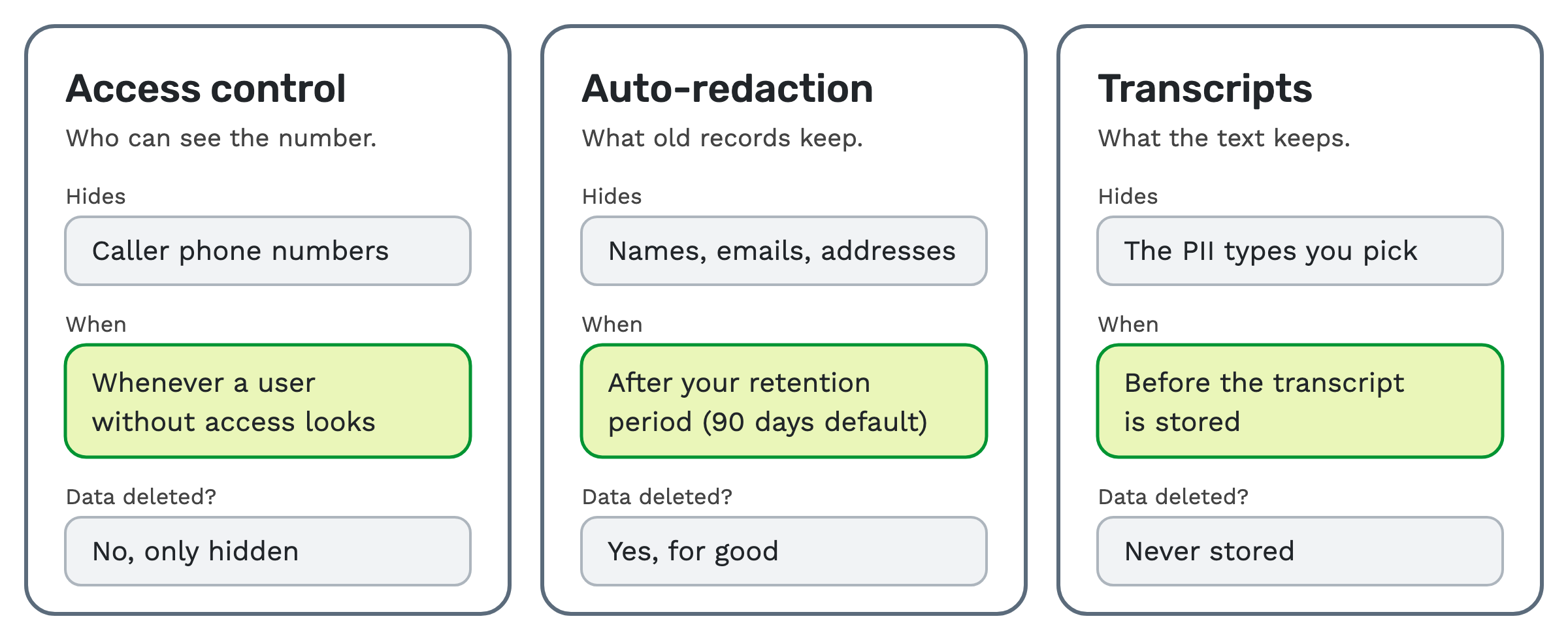 - PII access control masks caller phone numbers for anyone you haven't given access. Nothing is deleted.
- PII auto-redaction clears or hashes the fields you pick once a record is old enough. There's no undo.
- Transcription redaction cuts sensitive data from a call's transcript before it's stored.
The first two are separate. You can use one, or both. Access control and auto-redaction both live under Account > PII Redaction, and only the company owner can change them. The PII redaction support article covers the settings.
How auto-redaction works, step by step
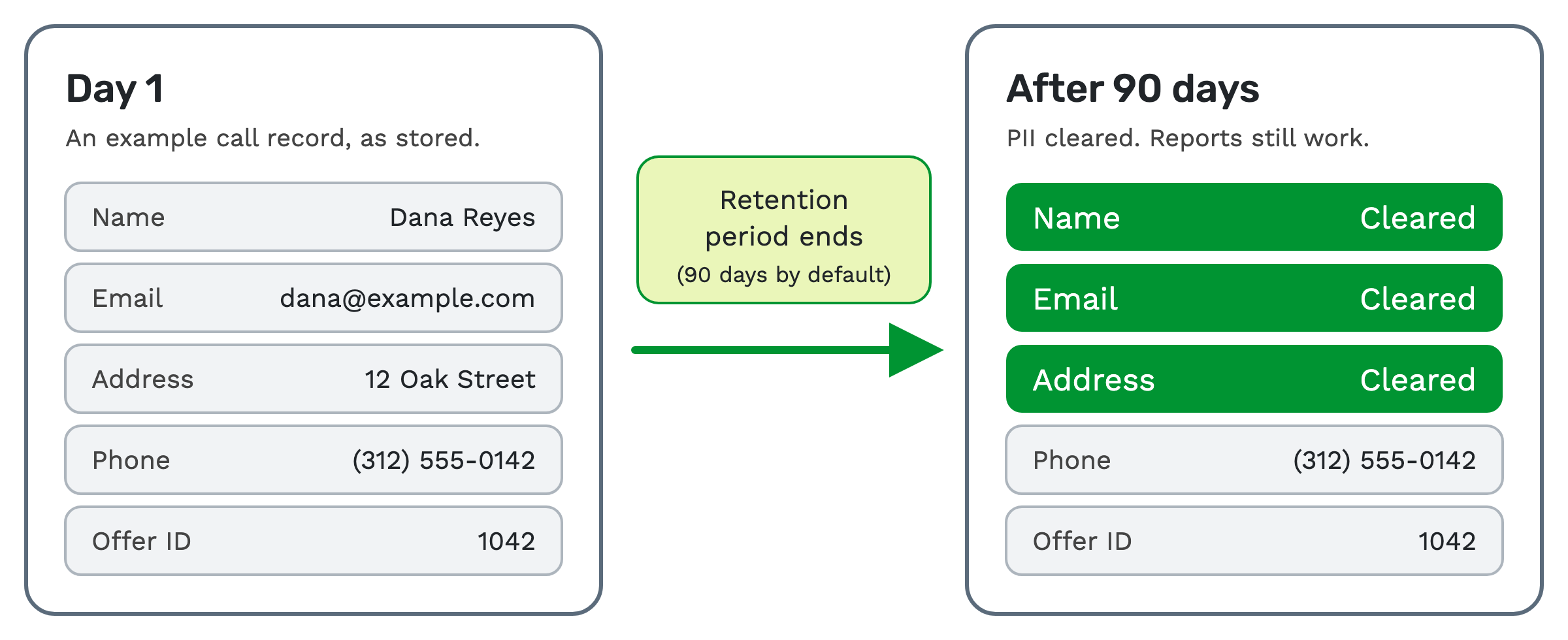 1. Set the retention period. A retention period is how long a record keeps its PII. You can set anything from 30
days to 7 years (2,555 days). The default is 90 days.
2. Pick the fields. You choose which personal fields get cleared. The list includes names, emails, addresses, dates of birth, IP addresses, visitor cookies, demographics and geographic data.
3. Pick the method. There are two:
- Nullify replaces each value with a placeholder. The original is gone.
- Hash replaces each value with a one-way fingerprint, so "John Smith" becomes something like "r1b2c3d4…". The original is gone too.
4. The data ages. Once a record passes the retention period, the fields you picked are cleared or hashed. The job runs hourly outside business hours, in batches. A large backlog is worked through over several runs.
Auto-redaction covers call records (archived calls too), archived lead records and the data store entries linked to them. It scrubs both the standard fields and custom data stored as JSON.
What stays, so your reports keep working
Auto-redaction leaves timestamps, offer IDs and phone numbers alone. Your call counts, your offer reports and your history by date still add up after a record ages.
Hashing keeps one more thing. The same input always gives the same fingerprint. So you can still tell that two records belong to the same person, without seeing who that person is.
Redaction is permanent, so export first
Auto-redaction can't be undone. Once a field is cleared or hashed, the old value is gone for good.
TrackDrive isn't built to be a long-term store for call recordings, transcripts, call logs or consent records. If you need those records, export them to your own systems before the retention period ends. To turn on auto-redaction, you also accept TrackDrive's Platform Services Agreement.
Who can see phone numbers: PII access control
Auto-redaction keeps phone numbers. PII access control is how you hide them.
When it's on, caller phone numbers are masked for every user except the people you grant access. A masked number shows only part of the digits, such as "+1555xxxx142". The masking applies in:
- data grids for calls, leads, contacts and logs
- data exports and quick exports
- webhook logs and system logs
- text message records
To let someone see full numbers, add their email to the PII access list on the PII Redaction page. While the restriction is on, TrackDrive support staff can't sign in as a user who has PII access. The security settings article shows where this sits.
How to redact PII from transcripts
A transcript is the written record of a call. AI call transcription on TrackDrive runs after the call ends.
Redaction takes sensitive data out before the transcript is saved. You turn on each PII category on its own, to match your program. The categories cover personal, financial and medical data, and more.
You set it per offer, alongside the other AI features listed on the transcriptions page. AI transcription has a per-minute rate. Redaction is billed at an additional per-minute rate.
What about the recording itself?
TrackDrive redacts fields and transcripts. Its pages don't say it redacts the audio of a recording.
Recordings are handled by retention instead. You set recording retention rules per call type, offer, schedule, buyer or traffic source. Once a recording is past its window, it's scrubbed. If you set no rule, the company-level retention setting applies; its default is 50 years.
The first 90 days of recording retention are free. After that, it's billed at a monthly per-minute rate. See TrackDrive pricing for commit plans.
Who it's for
- Networks can use access control so team members can work the data without seeing caller numbers.
- Buyers can use auto-redaction to keep their sales reports and drop personal details from old records.
- Marketers can use transcript redaction to search and review calls without the sensitive parts in the text.
If you need every record in full for years, export it first, or set a longer retention period.
Redaction is a tool, not compliance on its own
TrackDrive's own page is clear: these tools don't guarantee compliance by themselves. You're responsible for setting them up and for meeting the laws that apply to your program. Check your own obligations; this article isn't legal advice.
Redaction is one tool among several. Exports follow the same PII permissions, so hidden data stays hidden. Pair it with consent and opt-out records and suppression and DNC lists.
Questions people ask
What is PII redaction? It hides or removes the details in your data that point to a real person. In TrackDrive that means masking phone numbers, clearing aged records and redacting transcripts.
Does auto-redaction remove phone numbers? No. Phone numbers, timestamps and offer IDs are kept so reporting works. Use PII access control to hide numbers.
Can I undo a redaction? No. Auto-redaction is permanent. Export anything you need before the retention period ends.
Does access control delete data? No. It only hides phone numbers from people without access. The data is still there.
When does auto-redaction run? Every hour, outside business hours, in batches. Records are redacted once they pass your retention period.
Who can change PII settings? Only the company owner.
See it in action
Request a demo for a live walkthrough tailored to your use case, or start free, with no credit card and no onboarding fee.